Get started
Why is my page not showing up?
Five causes explain a missing page: what Facebook shared when you consented, whether Facebook has restricted the page, which profile administers it, whether another Facebook profile already holds it, and whether your plan has room. The first three explain a page that never reaches the available list. The last two explain a page you can see but cannot link. Work the checklist below in order, because it is ordered by how fast each cause is to rule out.
Which checks come first?
Section titled “Which checks come first?”Each row is one check you can run yourself. The first three are the cause in most cases, and the last row is the point at which support can help faster than you can.
| # | Check | How to tell | Fix |
|---|---|---|---|
| 1 | Facebook shared fewer pages than you administer | Facebook’s business integrations settings list AFP with the pages it may use. Count them against the pages listed under that profile on Accounts | Click Refresh Token on the profile and approve all current and future pages |
| 2 | Facebook has restricted or banned the page | Facebook’s business integrations still list the page, but AFP does not. Check the page’s own status on Facebook | Resolve the restriction with Facebook. AFP lists the page again once Facebook starts returning it |
| 3 | No attached profile administers the page | The page is under no profile group on Accounts, available or linked | Attach the Facebook profile that administers it |
| 4 | The profile’s access has stopped working | The profile group reads Expired, and its available pages are gone with it | Click Refresh Token, then reopen the available list |
| 5 | The page is already linked here | It is on the linked list, or under Disconnected, rather than Available | Nothing, or reconnect it |
| 6 | Another Facebook profile holds the page | AFP reported that pages “are already connected under another profile and were skipped” | Link that one page on its own, which produces the takeover prompt |
| 7 | Your last re-authorisation narrowed the grant | AFP reported “page(s) disconnected.” when Facebook returned you to Accounts | Click Refresh Token again and approve every page this time |
| 8 | The plan allowance is full | AFP names the counts: “You have 2 of 2 pages and tried to add 1” | Disconnect a page you do not automate, or upgrade |
| 9 | The profile is deactivated | The profile is listed under the inactive profiles, marked Disconnected | Reactivate it, then relink its pages |
| 10 | None of the above | You have run checks 1 to 9 | Open a ticket with the details in What should I send support? |
Which list is the page missing from?
Section titled “Which list is the page missing from?”The three places a page can appear mean different things, and naming the right one removes most of the guesswork.
| Where you looked | What it lists | A page missing from it means |
|---|---|---|
| Accounts → available pages | Pages your attached profiles administer on Facebook, minus the ones already linked | Facebook is not returning the page for any attached profile |
| Accounts → linked pages | Pages you have linked and AFP can act on | The link never completed, or the page was unlinked |
| The page selector in the campaign canvas | Your linked pages only | The page is not linked yet, whatever the available list shows |
The available list is rebuilt every time you open it. AFP asks Facebook, profile by profile, which pages that profile administers, then removes the ones already linked to your account. Nothing is cached, so a page absent from that list is a page Facebook did not return.
Did Facebook share the page with AFP?
Section titled “Did Facebook share the page with AFP?”AFP shows exactly the pages Facebook returns for each attached profile, so a page Facebook withholds is a page AFP cannot display, link, or act on. Two grants have to be in place before Facebook returns it.
The profile must administer the page. AFP asks Facebook for the page’s own access when you link it, and Facebook issues that only to a profile with an admin role on the page. A profile with a lesser role, such as editor, moderator or advertiser, never produces a page AFP can use, and the link is refused as having no admin access.
Consent must cover that specific page. Facebook’s consent screen asks which pages the app may use, and a page you did not approve there is not shared, even though you administer it. This is the most common cause by a wide margin, and it is invisible from inside AFP: a partial grant looks exactly like a page that does not exist.
Count the pages Facebook granted
Section titled “Count the pages Facebook granted”This is the one check that separates a Facebook problem from an AFP problem, so run it before anything else.
- Open Facebook’s business integrations settings and find AFP in the list of connected apps.
- Read the pages listed against it. That list is the whole of what AFP can see for that profile.
- Compare it with the pages shown under the same profile on Accounts, available and linked together.
Two counts that agree mean AFP is showing everything Facebook shared, and the page you want was never granted. Two counts that disagree mean Facebook is granting a page it then declines to return, which is what a restriction looks like from here. Check that page’s status on Facebook, then open a ticket if it is not restricted.
Approve all current and future pages
Section titled “Approve all current and future pages”When you re-consent, approve every page rather than selecting them one at a time. Facebook’s page step offers an option covering all current and future pages, and that option is the one to use.
| What you approve | What happens |
|---|---|
| All current and future pages | Every page appears now, and a page you create later appears without another round-trip to Facebook |
| A selection of individual pages | Only those pages appear. Everything else is missing, and a page created later stays missing |
| Nothing, or you cancel | The profile stays exactly as it was, with the grant it already had |
Widening the grant is the same action as repairing it: click Refresh Token on the profile on Accounts, approve the pages on Facebook, and AFP links the newly granted pages when Facebook returns you. It reports what it did, as “new page(s) connected.”
| What you granted | What AFP can do |
|---|---|
| Admin role plus consent covering the page | The page appears in the available list and can be linked |
| Admin role, but the page not covered by consent | The page is absent from the available list |
| Consent given, but no admin role on the page | The page can appear, then the link is refused with a message about admin access |
Page permissions and tokens lists each permission AFP requests on Facebook and Instagram and what it enables.
Why did re-authorising disconnect my pages?
Section titled “Why did re-authorising disconnect my pages?”Because AFP treats each Facebook grant as the whole truth about that profile. Every time you re-authorise, AFP compares the pages Facebook now returns against the pages it holds for that profile, links what is new, and disconnects what Facebook no longer returns.
That makes a narrowed grant destructive rather than harmless. Re-consenting with two pages selected where three were linked disconnects the third, switches off its campaigns, and reports “page(s) disconnected.” on your return to Accounts.
| What you did on Facebook | What AFP does on your return |
|---|---|
| Approved more pages than before | Links the new ones and reports how many pages were newly connected |
| Approved the same pages | Nothing changes |
| Approved fewer pages | Disconnects the pages you dropped, switches off their campaigns, and notifies you |
| Cancelled the consent screen | Nothing changes |
A page disconnected this way is not lost. It moves to Disconnected with its campaigns, contacts and comment activity intact, and re-authorising with the page approved brings it back. Its campaigns stay switched off until you activate them again.
One case looks like a bug and is not: when Facebook returns no pages at all for a profile that has linked pages, AFP treats that as a Facebook fault rather than a revoked grant and changes nothing. Nothing is disconnected, nothing is reported, and the comparison runs again next time.
Is the right Facebook profile attached?
Section titled “Is the right Facebook profile attached?”One AFP account holds as many Facebook profiles as you attach to it, and each profile brings only the pages that profile administers. A page administered by a profile you have not attached does not appear anywhere in AFP, because AFP has nothing to ask Facebook with.
The available list is grouped by profile, with each group under that profile’s name and avatar. An empty group, or a group you expected and cannot find, is the signal.
| What you see | Cause | Fix |
|---|---|---|
| The page is not under any profile group | No attached profile administers it | Attach the Facebook profile that does, from Accounts |
| A whole profile group is missing, and the profile is flagged as expired | AFP asked Facebook for that profile’s pages and was refused | Click Refresh Token on the profile, then reopen the list |
| The profile is listed as deactivated | The profile was switched off, which unlinked its pages | Reactivate the profile, then relink its pages |
| The page sits under a different profile than you expected | Another attached profile administers it on Facebook | Link it from that group, since the page works the same either way |
Signing in to AFP with a different Facebook profile does not attach it. Attaching happens from Accounts on an account that signs in with an email address and password; an account created with Facebook sign-in holds one identity until you add an email address to it. Manage profiles under one account covers attaching, deactivating, and removing a profile.
Is the page already linked somewhere else?
Section titled “Is the page already linked somewhere else?”A page is held by one Facebook profile at a time, across the whole of AFP. Somewhere else means any of four things, and the last two are the ones people do not think to check.
| Where the page is held | How it behaves |
|---|---|
| Another profile on your own AFP account | The page is skipped, and AFP says pages “are already connected under another profile and were skipped” |
| A second AFP account of your own, such as an older Facebook sign-in you stopped using | Identical to the row above. AFP cannot tell that both accounts are you |
| Someone else’s AFP account | Identical again, until you link the page on its own and confirm the takeover |
| Your own account, but disconnected earlier under a different profile | Still counts as held. A disconnected page keeps its profile, and re-approving it on Facebook does not move it |
This is the cause worth ruling out whenever a page you certainly administer never appears and the Facebook grant checks out. If you have ever connected the page through a different AFP login, or through a different Facebook profile, that is where it still lives.
How you find out depends on how you tried to link it, and only one of these routes offers you the takeover.
| How you tried | What you see |
|---|---|
| Re-authorising a profile, which relinks its pages automatically | The held pages are skipped with a message and no prompt. The automatic pass never takes a page from another profile |
| Selecting several pages and linking them | The pages not held elsewhere link, the held ones are skipped, and the count is lower than your selection |
| Reconnecting several pages at once | AFP names the count and tells you to “Reconnect them one by one to take over” |
| Reconnecting a single page | Page already linked, with a prompt warning that the existing connection will be removed. It completes only after you confirm |
| Reconnecting a page no attached profile administers | “Couldn’t reconnect this page. It may be linked to another account.” |
Linking one page at a time is therefore the diagnostic, not just the fix: it is the only route that tells you the page exists and is held, rather than staying silent.
Confirming the takeover moves the page to your account, brings its saved conversation history with it, and notifies the account that held it. Walking away leaves everything where it was.
A page’s own campaigns, contacts, and comment activity do not travel with a takeover the way conversation history does. The previous account keeps what it recorded, and the page arrives on your account with no campaigns bound to it.
Can two accounts manage the same page?
Section titled “Can two accounts manage the same page?”No. One page is held by exactly one Facebook profile on one AFP account, and linking it elsewhere takes it away from there. There is no shared or read-only mode: the account that holds the page is the account whose campaigns run on it, and every other account sees the page as claimed.
Two ways to work around that, depending on what you actually need.
| What you need | What to do |
|---|---|
| Several people operating the same page | Have them work from the same AFP account, which can hold several Facebook profiles and all of their pages |
| The page to move to a different owner permanently | Link it from the new account and confirm the takeover. The previous account is notified and loses the page |
A teammate’s page is a different case from a claimed one. A page another member of your team manages is listed with NO ACCESS rather than skipped, and the fix is permission, not a takeover: “This account is managed by another team member. Ask an admin to give you access.” Team roles covers who can see which pages.
Is your plan blocking the link?
Section titled “Is your plan blocking the link?”Three plan checks run before AFP links anything, and each one fails differently, so the message tells you which one you hit.
| Check | How it counts | What you see when it fails |
|---|---|---|
| Active subscription | Your account either has one or it does not | The link is refused with a subscription message |
| Page allowance | Every page on the account across all attached profiles, counted as though the pages you selected were already linked | The whole selection is refused, naming your current count, the limit, and how many more you can add |
| One profile at a time | Below Team Scale, active Facebook pages come from a single profile | Linking a second profile’s pages is refused while the first profile still has active pages |
Two details about the allowance make a page go missing rather than produce an error.
A page you cannot use still occupies a slot. The count includes every linked page whatever its status, so a page whose access has expired, or one Facebook has restricted, holds its slot until you disconnect it. Disconnected pages do not count, which is what makes disconnecting the fastest way to free room.
When there is not enough room for everything, pages with an Instagram account attached are linked first. An automatic pass after re-authorisation fills the free slots in that order and reports “Page limit reached. Some newly-granted pages were not linked.” A specific page left out of a partial link is usually this, not a problem with the page.
The page allowance is counted after your selection, so linking several pages at once can fail where one page would have gone through. Selecting a single page is the quickest way to tell a plan limit apart from a problem with a specific page.
Plan allowances change, so read the current numbers in the app. Plan quotas covers which limits exist and where each one is enforced.
Is the page restricted on Facebook?
Section titled “Is the page restricted on Facebook?”A page Facebook has restricted, banned or unpublished stops being returned to AFP, so it drops out of the available list. That symptom is identical to a page your consent never covered, which is why a restriction reads as a grant problem and sends people down the wrong path.
Where a restricted page still appears is the difference worth knowing.
| Where you look | What you see |
|---|---|
| The available list | Nothing. Facebook no longer offers the page, so AFP has nothing to list |
| The linked list, if the page was linked before the restriction | The page stays, because a linked page is a stored record rather than a live read of Facebook |
A linked page Facebook has stopped returning is disconnected the next time you re-authorise its profile, and its campaigns are switched off with it. That is the same mechanism as a narrowed grant, described in why re-authorising disconnects pages.
AFP has no check of its own for a restriction and never reports one, because Facebook does not say a page is restricted. The page simply stops coming back. Confirm a restriction on Facebook, not in AFP.
Two consequences matter when you are counting pages.
- A linked but restricted page holds its slot in your page allowance until you disconnect it. Disconnecting it frees room for a page you can use.
- A page whose restriction you have appealed and cleared comes back when you re-authorise its profile. Its campaigns stay switched off until you activate them again.
Why is my Instagram account missing?
Section titled “Why is my Instagram account missing?”An Instagram business account reaches AFP by one of two routes, and each route rules the other one out.
| Route | When the account appears | When it does not |
|---|---|---|
| With its Facebook page | Linking the Facebook page attaches the Instagram account with it, running on that page’s access | The Facebook page is not linked, or the Instagram account is not attached to it on Facebook |
| Instagram Business Login | The account connects on its own and is listed as its own group on Accounts | AFP already reaches the account through a linked Facebook page, so Business Login refuses it |
Four more things stop an Instagram connection, each with its own message when Instagram returns you to Accounts.
- The consent link expired. It is single use and lasts ten minutes. Opening it twice, cancelling on Instagram’s screen, or coming back later all end with nothing connected.
- The account changed hands recently. An account taken over by another AFP account cannot be claimed again for 48 hours.
- The plan does not cover a standalone account. Below Team Scale the connection succeeds but the account arrives disconnected, and AFP says so when it returns you.
- An account with that identifier is already stored as a Facebook page. The connection is refused rather than overwriting the existing record.
An Instagram account reached through a Facebook page held by someone else has its own message, and it names both routes out: “This Instagram account is connected through a Facebook page on another account. Reconnect that Facebook page here, or ask its current owner to disconnect it first.”
Manage connected pages covers reconnecting, deactivating, and permanently deleting a standalone Instagram account.
How do I know it worked?
Section titled “How do I know it worked?”The page is listed on Accounts with an active status, under the Facebook profile that administers it, or as its own group for a standalone Instagram account.
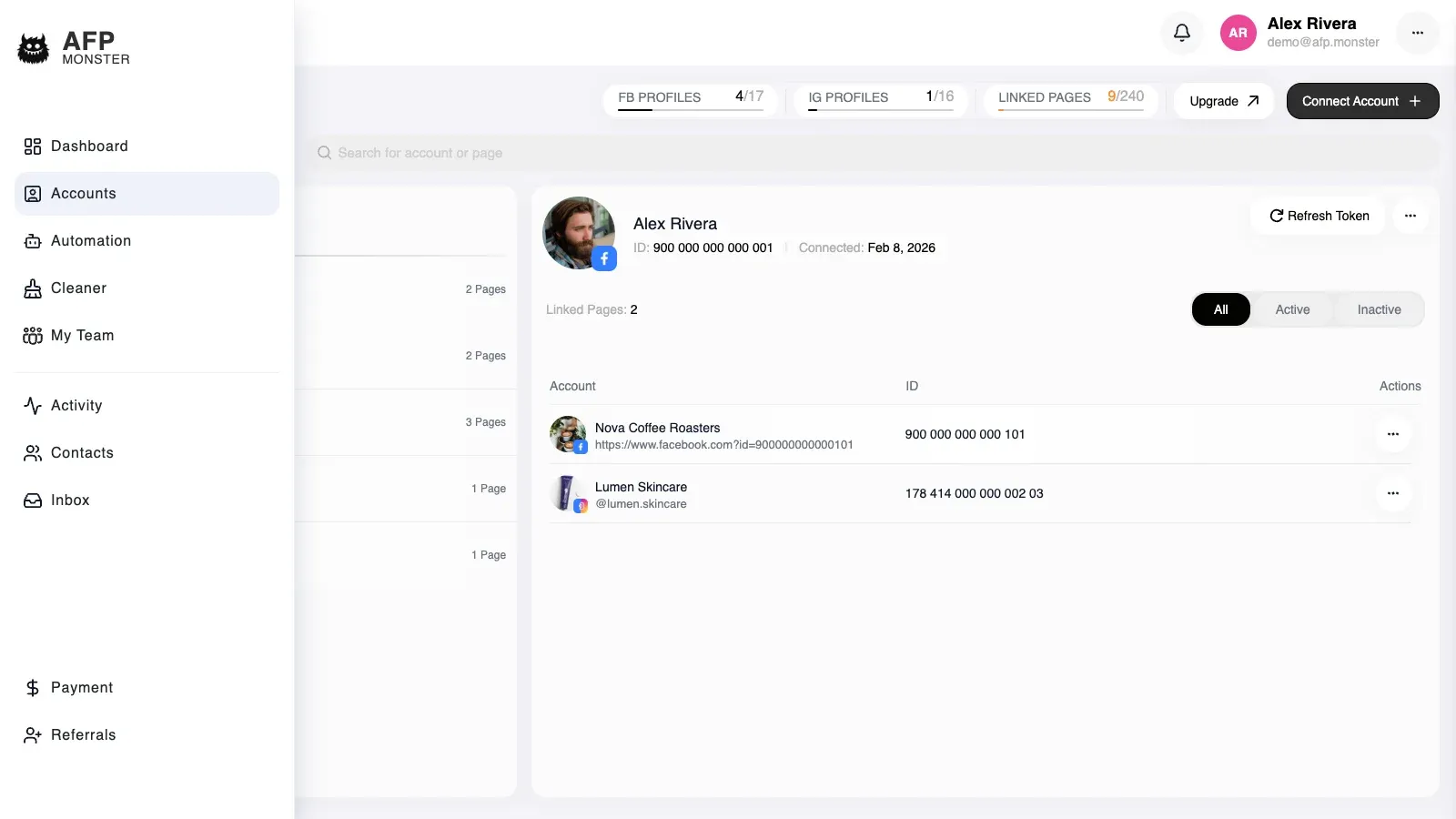
The second signal is stronger, because it proves AFP can reach Facebook or Instagram with the access it stored rather than only that a row exists: open the campaign canvas, choose the page, and open a trigger node’s post list. Posts load only for a page AFP can actually reach.
A Facebook profile group carries the worst status among its pages, so one expired page marks the whole profile. Open the group to see which page it is.
What should I send support?
Section titled “What should I send support?”Everything below is something support has to ask for otherwise, and each question costs a round-trip. Sending all six with the ticket is usually the difference between one reply and four.
| What to send | Why it is needed |
|---|---|
| The name of the Facebook profile the pages should be under | Every check starts from one profile, not from your account |
| The names of the pages you expect and cannot see | Page names let support look up where each page is actually held |
| A screenshot of Facebook’s business integrations settings, showing AFP and the pages granted to it | This is the only proof of what Facebook shared, and it is not visible to support |
| Whether you have, or ever had, another AFP account, and which one | A page held by your own second account is invisible and looks identical to a grant problem |
| Whether the pages are restricted or banned on Facebook | It changes what a fix can achieve, and AFP cannot see it |
| How many pages you see against how many your plan allows | Separates a full allowance from a missing page |
Say which of the checks above you already ran and what each one showed. A ruled-out cause is as useful to support as a symptom. Get help covers opening a ticket and following the reply thread.
- Send your first auto-reply - build the campaign that answers a comment on the page you just linked.
- Manage connected pages - unlinking, re-authorising, and reconnecting a page later.