Contacts
Work with contacts
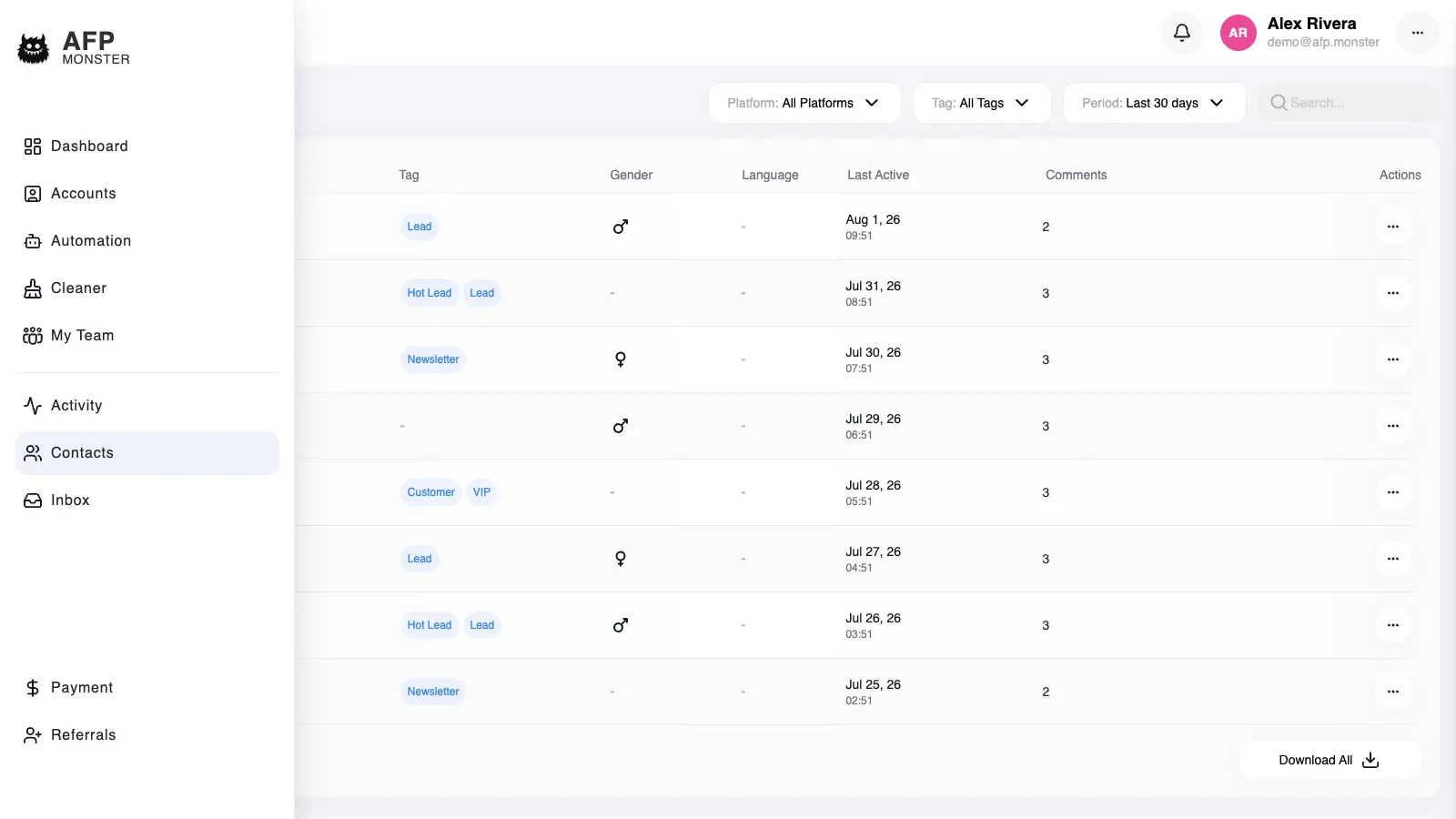
A contact is AFP’s record of one person who interacted with one of your connected pages: their platform name and photo, which platform they came from, when they were last active, how many comments they have left, and the tags on them. AFP creates contacts for you — nobody adds one by hand — and under Contacts you filter, search, tag, and delete them.
What you need first
Section titled “What you need first”- A connected page that AFP is receiving events for. Nothing reaches the contact directory from a page that is not connected. See Connect a page.
- At least one real interaction on that page. A page with no comments has an empty contact directory, and there is no way to seed it.
Where do contacts come from?
Section titled “Where do contacts come from?”A contact is created the first time AFP handles a comment from a profile it has not seen on that page and platform. The comment is stored, and the contact behind it is created in the same moment, with no tags and with the last-active time set to that interaction.
Every later interaction from the same person updates the existing record instead of adding another. The last-active time moves to now, the name is refreshed to the username the platform reports, and the profile photo is fetched if the record still has none.
A DM from someone who has never commented on your page does not create a contact.
A contact belongs to one platform. The same human commenting on your Facebook page and on your Instagram account is two contacts, because the two platforms identify them with different profile identifiers, and the two records carry their tags and comment counts separately.
What does a contact record hold?
Section titled “What does a contact record hold?”| What the record holds | What it means | How it gets there |
|---|---|---|
| Name | The username the platform reported for the person | Written when the contact is created, refreshed on every later interaction |
| Platform | Facebook or Instagram | Set when the contact is created and never changes |
| Profile photo | A copy of the person’s platform profile picture, stored by AFP | Fetched shortly after the contact is created; retried on the next interaction whenever it is still missing |
| Last active | When AFP last handled an interaction from this person | Updated on every interaction; sorts the contact list and drives the date-range filter |
| Comments | How many comments the contact has left on your pages | Counted from the comments linked to the record each time the record is read |
| Tags | The labels attached to this contact | Applied by hand, or by an Add tag or Remove tag node — see Segment contacts with tags |
| Page | The connected page the person was seen on | Recorded when the contact is created and kept current on later interactions |
A contact record holds no message history of its own. Conversations live in the inbox, and public comments live in the comment activity feed; the contact is the stable identity those two hang off. Clicking a commenter’s name in the activity feed opens their contact record by looking them up from their platform profile. Contact fields lists every field a record carries and where its value comes from.
How do I find one contact in the list?
Section titled “How do I find one contact in the list?”The list is ordered by last activity, newest first, and arrives 20 contacts at a time. Four controls narrow it, and they combine — a contact has to satisfy all of them to appear.
| Control | What it matches | Worth knowing |
|---|---|---|
| Platform | Facebook contacts, Instagram contacts, or both | Defaults to both |
| Tag | Contacts carrying the tag you choose | One tag at a time, not a set |
| Date range | Contacts active within the last n days | Defaults to the last 30 days. Set it to All to search the whole directory |
| Search | Part of the contact’s name, in any case | Matches the name only — not message text, not tags, not the platform profile identifier |
The 30-day default explains most contacts that look missing. Widen the date range before concluding that a record does not exist.
Search matches anywhere inside the name, so mar finds both Marta Nowak and Omar Haddad. Combine it with a tag when a common fragment returns too much.
Clicking a contact opens its full record, with the same comment count the list shows. A record that was deleted after the list loaded opens as nothing found rather than as an error.
If your account sits under a master account, the contacts that master account owns appear in this list alongside your own and answer to the same filters. Without that shared scope you see only the contacts from pages your own account owns, even when a colleague’s page has talked to the same person.
How do I tag a contact?
Section titled “How do I tag a contact?”- Open Contacts and click the contact, or open that person’s conversation in the inbox.
- Open the tag picker on the record.
- Select every tag the contact should carry.
- Save.
The picker submits the whole set of tags rather than the one change you made, so a tag you clear and then save is removed from the contact. Selecting the same tag twice collapses to one entry, and the order you pick them in is not stored.
Every tag in what you save has to be one your account can see. A single unknown tag refuses the whole change, and the contact keeps the tags it had.
Tags on a contact show up beside that person’s conversation in the inbox the next time the conversation list loads, and they become a filter on the contact list. Segment contacts with tags covers creating tags, renaming them, and applying them from a campaign.
Can I add or import a contact myself?
Section titled “Can I add or import a contact myself?”No. There is no button that creates a contact, no CSV import, and no way to copy a directory in from another tool — a contact exists only because someone interacted with a connected page. The way to grow the directory is to earn more interactions, which is what a comment-to-DM campaign does. See Route comments to a DM.
The same rule holds inside a campaign. An Add tag node never creates a contact: when the person it runs for has no record yet, the node writes nothing, records that it ran, and the execution carries on to the next node.
What happens when I delete a contact?
Section titled “What happens when I delete a contact?”Deleting removes the record immediately. There is no archive, no restore, and no trash to recover it from, so treat the confirmation as final.
Deletion is narrower than it looks. What it does not do:
- It does not delete the person’s comments. They stay where they are on your posts and in the comment activity feed, no longer linked to any contact record.
- It does not delete the tags that were on the contact. A tag is an account-level label; only this contact’s copy of it goes away. Deleting tags is a separate action — see Segment contacts with tags.
- It does not block the person or stop future interactions. Their next comment on a connected page creates a brand-new contact record, with no tags, no photo yet, and a comment count that starts from that comment, because the older comments are no longer linked to anything.
- It does not remove the conversation from the inbox. The thread stays in the list; what disappears from it is the tags, because the inbox reads those from the contact record.
Deleting a contact that has already been removed — in another tab, or by another member of a master account — reports that nothing was removed rather than raising an error. Reload the list to see the current state.
Why is a contact missing from the list?
Section titled “Why is a contact missing from the list?”| Symptom | Cause | Fix |
|---|---|---|
| A contact you worked with last month is gone | The date-range filter defaults to the last 30 days | Set the date range to All |
| Someone commented but no contact appeared | The comment arrived on a page AFP is not receiving events for, so nothing was handled | Check the page under Accounts and link it again if needed. See Connect a page |
| Someone sent a DM and no contact appeared | Contact records are created on the comment path | Nothing to change today. See the note under Where do contacts come from? |
| Searching for words the person wrote finds nothing | Search matches contact names only | Search by name, or find the conversation in the inbox instead. See Handle conversations in the inbox |
| The same person appears twice | One record per platform — the Facebook and Instagram identities are separate contacts | Tag both records if your segments need to cover the person on both platforms |
| The name on a record is out of date | The name is refreshed only when AFP handles a new interaction from that person | Wait for their next comment; the record updates itself |
| A contact has no profile photo | The photo fetch has not finished, or the person’s platform profile does not expose one | Nothing to do. AFP retries on the next interaction from that person |
| Filtering by a tag returns nothing | The tag filter combines with the date range, and the tag may never have been applied | Set the date range to All, then confirm the tag on the contact record |
| Opening a contact shows nothing found | The record was deleted after the list was loaded | Go back to Contacts and reload the list |
| A campaign sent a DM but the recipient is not in the directory | A campaign looks a contact up by the platform profile it is running for, and never creates one | Check the execution history for what the run actually did. See Test and debug a campaign |
| A colleague’s contacts are not in your list | Contacts belong to the account that owns the page, and sharing through a master account is what makes another account’s records visible | Confirm both pages sit under the same master account |
Related
Section titled “Related”- Contact fields — every field on a contact, its type, and whether you can change it.
- Segment contacts with tags — the labels that make the contact directory filterable.
- Handle conversations in the inbox — the conversation behind a contact.
- Route comments to a DM — the campaign that turns commenters into contacts and conversations.
- Test and debug a campaign — check what a campaign did for one recipient.