Campaigns
Read the dashboard
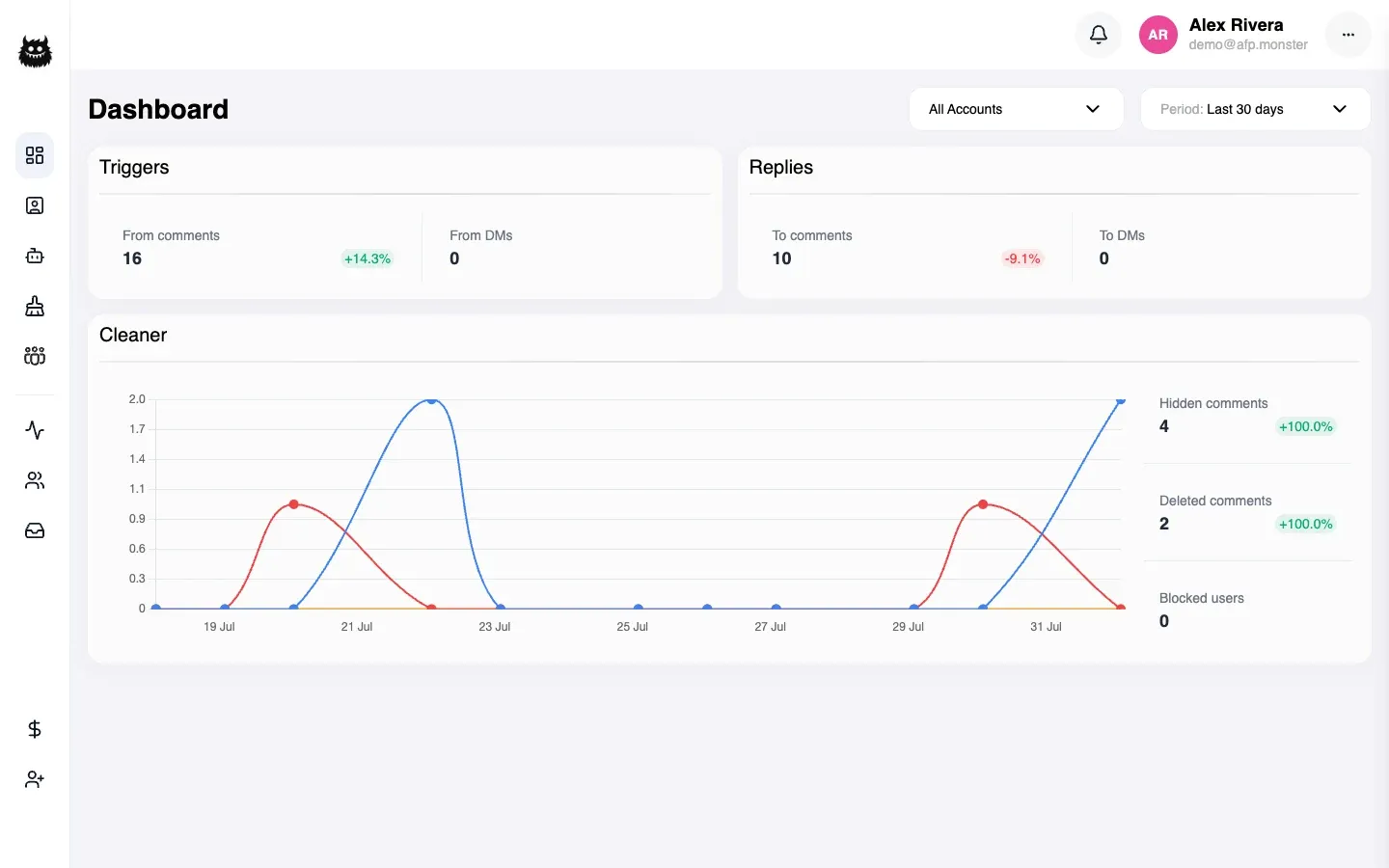
The dashboard answers one question per figure: how much work your automations did in a period, and how much of it was moderation. Two controls at the top drive everything below — which account you are looking at, and which period. Each figure carries a percentage comparing that period with the one immediately before it, so a number is always shown against its own recent history rather than in isolation.
What you need first
Section titled “What you need first”- At least one connected page. With none, every figure is zero. See Connect a page.
- At least one campaign that has run, for the triggers and replies figures to move. See Build a campaign on the canvas.
What do the two filters do?
Section titled “What do the two filters do?”The account selector narrows everything to one Facebook profile, or leaves it at All Accounts.
The period selector sets the window every figure is counted over:
| Period | Window |
|---|---|
| Last 24 hours | The past day |
| Last 3 days | The past three days |
| Last 7 days | The past week |
| Last 30 days | The past month |
| This year | 1 January to today |
| All time | Everything on record |
| Custom | Dates you choose |
Changing either filter recalculates every figure and the chart together.
What does each figure count?
Section titled “What does each figure count?”| Card | Figure | Counts |
|---|---|---|
| Triggers | From comments | Comments your automations processed in the period |
| Triggers | From DMs | Automations started by a direct message |
| Replies | To comments | Comments AFP published a reply on |
| Replies | To DMs | Direct messages AFP sent |
| Cleaner | Hidden comments | Comments AFP hid |
| Cleaner | Deleted comments | Comments AFP deleted |
| Cleaner | Blocked users | Comments that resulted in the commenter being blocked |
A comment that triggered an automation and got a reply is counted once under Triggers and once under Replies. Those two cards measure different stages of the same event, so they are not meant to add up to each other.
Comments that failed because a sign-in expired or a subscription lapsed are not counted as triggers. That keeps the triggers figure a measure of work done rather than work attempted. Those failures surface as notifications instead — see Notification catalogue.
Why do the comment and DM figures never overlap?
Section titled “Why do the comment and DM figures never overlap?”Because they come from separate places and cover separate events. From comments counts comments; From DMs counts automations a message started. Nothing is in both, so the two halves of a card add together to the total for that card.
Why do hidden, deleted, and blocked never add up to more than the total?
Section titled “Why do hidden, deleted, and blocked never add up to more than the total?”Because a comment has exactly one moderation state. It is hidden, or deleted, or the commenter was blocked — never two at once.
When more than one thing happened to a comment, the strongest one wins:
- Blocked
- Deleted
- Hidden
So a comment that was deleted and whose author was then blocked appears once, under Blocked users, and not under Deleted comments. That is why the three figures can be added without double-counting, and why the deleted figure agrees with the chart beside it.
What does the percentage mean?
Section titled “What does the percentage mean?”It compares the period you selected with the period of the same length immediately before it. Last 7 days is compared against the seven days before those.
A figure with nothing to compare against shows no percentage rather than showing zero.
The comparison is anchored to when the comment arrived, not to when AFP acted on it. A comment that arrived at the end of one window and was moderated at the start of the next is counted in the first.
Why is it not working?
Section titled “Why is it not working?”| Symptom | Cause | Fix |
|---|---|---|
| Every figure is zero | No connected page, or no campaign has run | Connect a page and activate a campaign |
| Triggers move but replies do not | The automations are moderating rather than replying | Expected if your campaigns hide or delete without a reply node |
| A figure dropped sharply with no change in activity | A page lost access part-way through the period | Check the notification panel and Page permissions and tokens |
| Deleted looks lower than you expect | Comments whose author was also blocked count as blocked, not deleted | Add the deleted and blocked figures together |
| No percentage appears | There is no comparable earlier period | Nothing to fix — pick a shorter period to get a comparison |
| The figures disagree with the activity list | The activity list shows individual comments; the dashboard counts them by state over a window | Use the activity list to check individual comments |
Related
Section titled “Related”- Moderate comments automatically — the campaigns behind the moderation figures.
- Bulk-remove comments with the cleaner — the other way comments get hidden and deleted.
- Test and debug campaigns — what to check when triggers are lower than expected.
- Notification catalogue — the alerts raised by the failures the dashboard excludes.