Pages and profiles
Manage profiles under one account
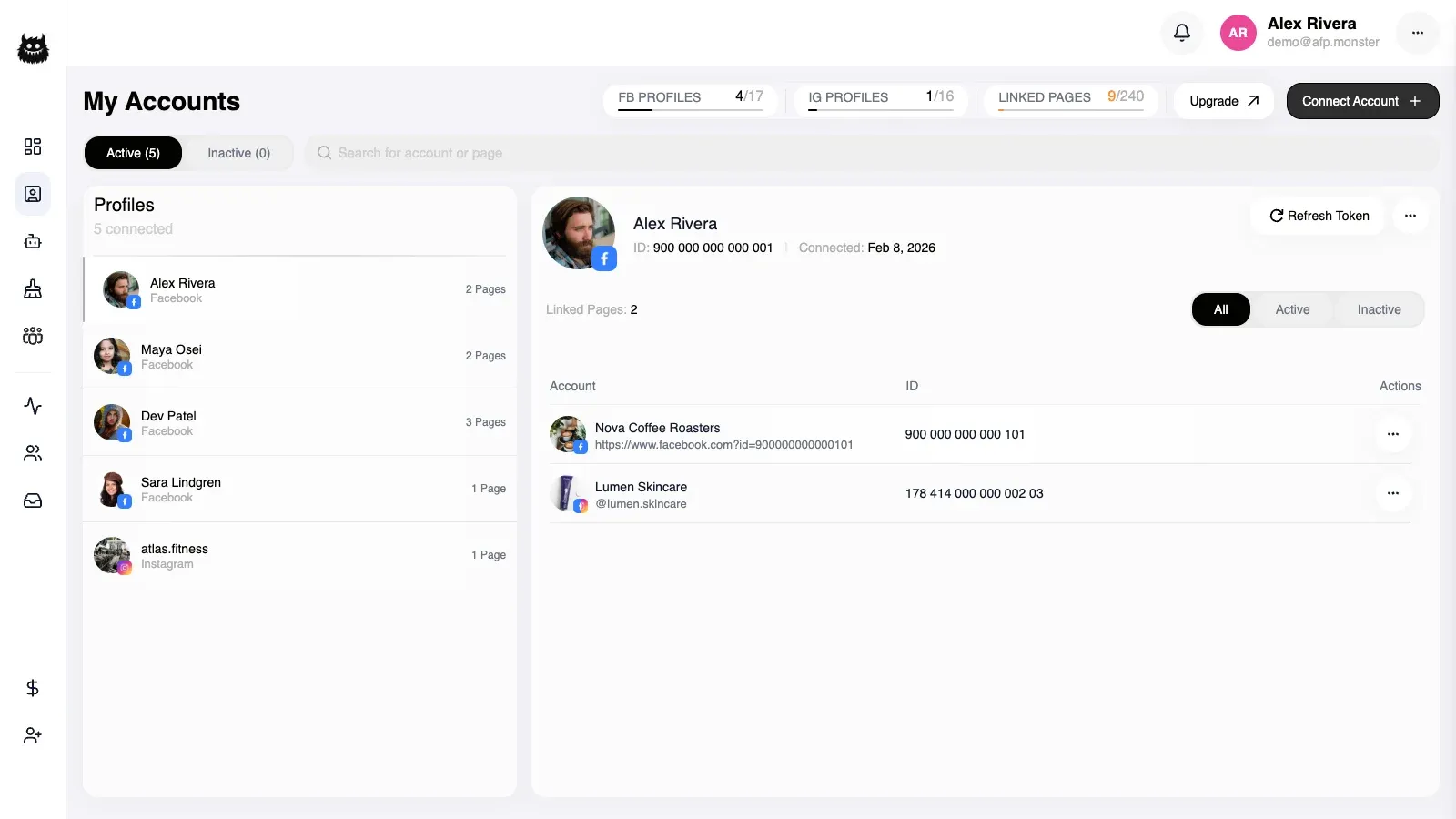
One account that signs in with an email address holds as many Facebook profiles as you attach to it, and each profile brings the pages it administers. You manage all of them from Accounts: attach a new profile with one Facebook consent screen, claim a profile another account holds, switch a profile off, or remove it. Attaching also merges the two sides’ subscriptions, payment records, referral programme, and keyword lists.
What you need first
Section titled “What you need first”- An account that signs in with an email address and password. A Facebook-only account holds one identity until you add an email address — see Create your account.
- A Facebook login for each profile you attach, with admin rights on the pages you want.
How does one account hold several profiles?
Section titled “How does one account hold several profiles?”An account holds profiles, a profile owns the pages it administers, and each page carries its own campaigns. An account with no profile attached still works: it has an email address, a subscription, and an empty page list. An Instagram business account connected on its own attaches straight to the account — see Manage connected pages.
Some things belong to the account and are shared across every profile under it; others belong to one profile. Elsewhere in these docs that shared scope is called the master account, which is this same email-login account.
| Belongs to the account | Belongs to one profile |
|---|---|
| Subscription and payment records | Pages, and the campaigns bound to them |
| Referral programme | Contacts and tags |
| Keyword lists | Comment activity, cleaner jobs, and inbox history |
Below Team Scale, active Facebook pages come from one profile at a time, so attaching a second profile does not put two profiles’ pages to work at once. Plan quotas covers how the page and profile allowances are counted.
I signed in with Facebook — how do I get an email login?
Section titled “I signed in with Facebook — how do I get an email login?”Signing in with Facebook alone gives you a profile, not an account with its own credentials. Adding an email address and password turns it into one, without losing anything you have built.
- Open Settings and give the email address and password you want to sign in with.
- AFP emails a six-digit code to that address. It is valid for ten minutes.
- Type the code into the same window.
The Facebook profile you were signed in as becomes the first profile under the new account, and your pages, campaigns, subscription, and payment records come with it. From then on you can sign in either way.
A wrong code tells you how many attempts are left, and too many wrong attempts stops the code working. Ask for a new one and start again. If the code expires before you use it, ask for another.
An account that already signs in by email cannot do this again — it already has credentials.
How do I attach a Facebook profile?
Section titled “How do I attach a Facebook profile?”- Open Accounts and start attaching a Facebook profile. AFP holds the request for five minutes.
- Consent on Facebook as the profile you want to attach.
- AFP moves the profile onto your account together with its pages, subscription, payment records, referral programme, and keyword lists, then returns you to the dashboard.
A trial subscription does not survive the merge when the other side is paying: attaching a profile that has a paid subscription switches off your account’s trial, and a profile carrying a fresh trial loses it to your account’s existing subscription.
Onboarding counts as finished if either side had finished it. From then on, signing in through Facebook as that profile signs you into this account.
What if the profile is already attached to another account?
Section titled “What if the profile is already attached to another account?”AFP does not move a profile away from another account silently. When the profile you consented with already belongs to a different account, the attach stops and the dashboard asks you to confirm the claim instead.
Confirming re-parents the profile and its pages to your account, with the same merge as an ordinary attach. The account that held the profile keeps no link to it and is not notified. Walking away leaves everything as it was, and confirmation is refused once the pending claim has gone — start the attach again.
Should I deactivate, disconnect, or delete a profile?
Section titled “Should I deactivate, disconnect, or delete a profile?”| Action | The profile | Its pages and data | Getting it back |
|---|---|---|---|
| Deactivate | Stays on your account, shown as deactivated | Every page unlinked, campaigns switched off, all data kept | Reactivate it |
| Disconnect | Detached from your account, no longer listed | Pages unlinked, campaigns switched off, the profile’s own record and data kept | Attach the profile again |
| Delete permanently | Removed | Pages, campaigns, run history, comment activity, cleaner jobs, contacts, tags, templates, and inbox history deleted | Not possible |
Deactivate and reactivate
Section titled “Deactivate and reactivate”- Open Accounts, find the profile, and deactivate it. AFP unlinks its linked pages, switches off their campaigns, notifies you per page, and reports how many pages it unlinked. An already-deactivated profile reports zero pages.
- To bring it back, start the reactivation and consent on Facebook again — AFP holds that request for five minutes too.
- AFP clears the profile’s expired-access flag and relinks its pages up to the room left in your page allowance, then reports how many it relinked, how many failed, and whether the allowance stopped it early.
Disconnect
Section titled “Disconnect”Disconnecting unlinks the profile’s pages, switches off their campaigns, and detaches the profile from your account. Use it to take a profile out of a multi-profile view without destroying anything: the profile’s record and its data survive, and only the link to your account goes.
A disconnected profile belongs to no account, so attaching it later runs as an ordinary attach rather than a claim you have to confirm. Its pages arrive unlinked, and you relink the ones you still automate.
Delete permanently
Section titled “Delete permanently”Only a deactivated profile can be deleted permanently — on an active profile the action is refused with a message saying so. Deletion removes the profile’s pages and everything attached to them, down to message templates, saved replies, notifications, and the support tickets opened from that profile.
Keyword lists survive, because they belong to the account rather than the profile, and so do your subscription, payment records, and referral programme.
How do I archive my own account?
Section titled “How do I archive my own account?”Archiving your own account is a soft delete with a retention window: AFP marks the account archived and returns the date on which deletion becomes permanent, 30 days out.
| While archived | What happens |
|---|---|
| Signing in | Still works. A Facebook sign-in reports the archived state, so the dashboard can offer to restore the account |
| Restoring | Returns the account to active with nothing lost |
| After 30 days | Deletion becomes permanent |
Restoring an account that is not archived is refused, with a message saying so.
How do I transfer a subscription to another account?
Section titled “How do I transfer a subscription to another account?”A transfer moves an active subscription from one account to another with a code. Every account gets one, shaped AFPM-XXXX-XXXX, generated the first time you open your settings.
- On the account giving up the subscription, copy the transfer code from Settings.
- On the receiving account, enter the code and redeem it.
- AFP moves the subscription across, prorates any subscription the receiving account already held, and issues the first account a new code so the used one stops working.
The account that gives up the subscription is left without one. Regenerating your code invalidates the old one, which is how you withdraw a code you have already shared.
Redeeming is refused for a code that matches nothing, for your own code, and for a source account whose subscription is missing or has already run out. Subscription lifecycle has the day arithmetic; Plans and billing covers buying a subscription in the first place.
Why did a profile action not work?
Section titled “Why did a profile action not work?”| Symptom | Cause | Fix |
|---|---|---|
| Attaching a profile is refused before Facebook opens | The account signs in with Facebook only, so it holds a single identity | Add an email address and password to the account first |
| Consent finishes but the dashboard asks you to confirm a claim | The profile already belongs to another account | Confirm the claim, or leave the profile where it is |
| Confirming a claim is refused | The claim was already used, or the profile is gone | Start the attach again |
| Reactivating relinks fewer pages than the deactivation unlinked | The page allowance filled up before the last pages were reached | Unlink pages you no longer automate, or move to a larger plan |
| Permanent deletion is refused | The profile is still active | Deactivate it, then delete it |
| Redeeming a transfer code is refused | The code is wrong or your own, or the source subscription is missing or expired | Ask for a fresh code from an account whose subscription is active |
| Restoring an account is refused | The account is not archived | Nothing to restore |
| Language and notification preferences do not save | No Facebook profile is attached to the account yet | Attach a profile, then set them |
Related
Section titled “Related”- Create your account — the two sign-in routes, and how to add an email address to a Facebook-only account.
- Manage connected pages — linking and re-authorising the pages a profile brings.
- Plans and billing — buying the plan that decides how many profiles and pages stay active.
- Plan quotas — where each allowance is enforced.