Pages and profiles
Manage connected pages
Connected pages live on Accounts, grouped under the Facebook profile that administers them or listed on their own for a standalone Instagram business account. From there you link another page, unlink one you no longer automate, re-authorise access that has stopped working, and reconnect a page you disconnected earlier. Unlinking is reversible: campaigns on the page are switched off, nothing is deleted, and reconnecting restores it. Permanently deleting a disconnected Instagram account is the only action here that cannot be undone.
What you need first
Section titled “What you need first”- A Facebook profile attached to your account, or an Instagram business account to connect. Connect a page covers the first link.
- An active subscription. Linking a page and connecting a standalone Instagram account both check for one before anything else and are refused without it.
- Admin access on Facebook to every page you add — AFP obtains page access only from a profile that administers the page.
What does each page status mean?
Section titled “What does each page status mean?”Every page carries one of three statuses, and a Facebook profile group carries the worst status of the pages inside it, so one broken page marks the whole profile.
| Status | What it means | What to do |
|---|---|---|
| Active | AFP can act on the page | Nothing |
| Expired | The stored Facebook or Instagram access no longer works | Re-authorise it |
| Disconnected | The page, or the profile that owns it, is switched off; the data is kept | Reconnect it |
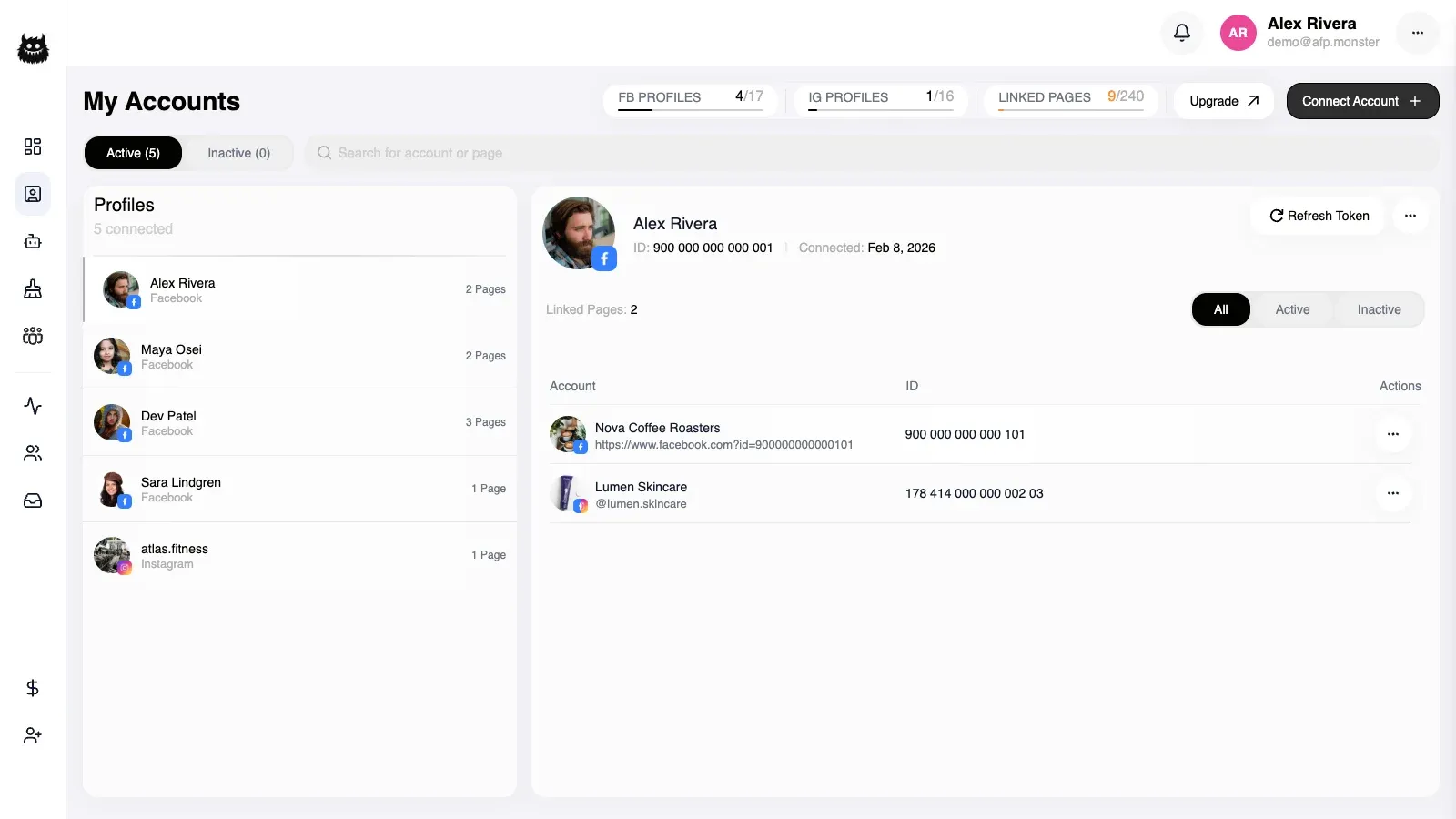
A page row also shows how many campaigns are bound to it. A disconnected Facebook page moves into the available list next to the pages you have never linked; a standalone Instagram account keeps its own group and stays listed while disconnected.
How do I link another page?
Section titled “How do I link another page?”- Open Accounts and open the available pages. AFP asks Facebook, profile by profile, which pages that profile administers, then removes the ones already linked to your account.
- Select the pages you want from a profile’s group.
- Link the selection. AFP reports how many pages it linked.
Three kinds of page are skipped rather than reported as failures: one the profile no longer administers on Facebook, one already held by a different Facebook profile, and one Facebook could not be asked about while you were linking. A linked count lower than your selection is the signal that something was skipped.
“A different Facebook profile” includes another profile on your own account and a second AFP account of your own, because a page is held by one profile at a time across the whole of AFP. AFP reports those as pages that “are already connected under another profile and were skipped”. Why is my page not showing up? works through finding where the page is actually held.
A successful link also moves the source profile’s contacts onto your account and merges tags that share a name. See Contacts and Tags.
How do I unlink a page, and can I get it back?
Section titled “How do I unlink a page, and can I get it back?”Unlinking is a soft disconnect: the page moves to Disconnected, every campaign bound to it is switched off, and the owning profile is notified. Contacts, tags, comment activity, and saved campaign graphs stay where they are, so the page can be brought back. Reconnecting covers three situations.
| Situation | What reconnecting does |
|---|---|
| The page is disconnected under your account | AFP checks that the stored page access still works and restores the page. Access that no longer works is refused with an expired-token message |
| The page was never linked here | AFP searches your attached profiles for one that administers it and links it from there, or reports that no linked profile has it |
| Another Facebook profile holds the page, on your account or on someone else’s | The takeover happens only after you confirm it, and the account that held the page is notified |
Reconnecting any one page of a profile that was switched off brings that whole profile group back to active.
How do I re-authorise access that has expired?
Section titled “How do I re-authorise access that has expired?”A Facebook profile
Section titled “A Facebook profile”- Open Accounts and find the profile flagged as expired.
- Start the token refresh. AFP hands you a Facebook re-consent link and holds the request for five minutes.
- Grant consent. AFP stores the new access, clears the flag, and the profile shows as active again.
Declining consent on Facebook changes nothing: no access is stored and the profile stays flagged.
A standalone Instagram account
Section titled “A standalone Instagram account”Start the Instagram connection again for the same account. AFP recognises the account as yours, replaces its stored access and its avatar, and keeps the page and its campaigns. Access granted through Instagram Business Login is long-lived rather than permanent — about 60 days — so this is periodic maintenance rather than repair.
Below Team Scale, an Instagram account that goes through this refresh comes back Disconnected, and AFP says so when it returns you to Accounts. Reconnect it from a plan that allows a standalone Instagram account.
What stops working while access is expired?
Section titled “What stops working while access is expired?”| Where you notice it | What happens |
|---|---|
| Accounts | The page shows Expired and its whole profile group is flagged |
| Adding pages | The profile’s group vanishes from the available list, so none of its pages can be linked |
| Reconnecting | A disconnected page is refused with an expired-token message until the profile is re-authorised |
| Post list on a Facebook trigger | AFP repairs the page’s access from the profile’s access and retries, so posts still load while the profile itself is healthy. An expired profile leaves nothing to repair it from |
| Post list on an Instagram trigger | The list comes back empty rather than reporting an error |
How is an Instagram account different from a Facebook page?
Section titled “How is an Instagram account different from a Facebook page?”| Aspect | Facebook page | Instagram business account |
|---|---|---|
| How it connects | Through a Facebook profile that administers it | With the Facebook page it belongs to, or on its own through Instagram Business Login |
| Whose access it uses | Page access stored at link time, backed by the profile’s access | Its own Instagram access when standalone; the Facebook page’s access otherwise |
| Where it appears | Inside its profile’s group | As its own group, listed even while disconnected |
| Restoring it after a disconnect | Reconnect it | Reconnect it, which requires Team Scale for a standalone account |
| Removing it for good | Unlinking is the only removal offered: the record stays and the page returns to the available list | A disconnected account can be deleted permanently, which removes the page and detaches its inbox conversations |
Connect each Instagram account one way only. An account AFP already reaches through a linked Facebook page is refused by Business Login, and an account connected by Business Login is not attached a second time when you later link its Facebook page.
A standalone account held by another AFP account changes hands when you connect it, and the account that held it is notified. An account that changed hands in the last 48 hours cannot be claimed again until that window passes.
A standalone account can also be deactivated and reactivated without going through Instagram again. Reactivation is refused when your page allowance is full, and reports that the limit stopped it. Permanent deletion works only on an account that is already disconnected.
How do I pick the post a campaign trigger watches?
Section titled “How do I pick the post a campaign trigger watches?”- Open the campaign on the canvas and click its
trigger_commentnode. - Set the post scope to a specific post. The settings panel loads the page’s posts.
- Choose the post and click Save, which writes a new graph version.
The list depends on the platform: a Facebook page returns its own posts together with its ad posts, each captioned with the post text, and an Instagram account returns its media with the caption and a thumbnail. Trigger events covers what each scope matches; Route comments to a DM uses the setting in a working campaign.
The post list loads only for a page on your own account. A page that belongs to another AFP account, or one that is not linked at all, is refused instead of returning posts.
Why is a page marked NO ACCESS?
Section titled “Why is a page marked NO ACCESS?”Because a teammate has already linked it and it is not in the set of pages assigned to you.
Facebook lists every page your profile administers, including ones somebody else in your team brought in. Those appear with a NO ACCESS badge and a reconnect control that does nothing. The row is shown rather than hidden so you can see the page exists and know why you cannot reach it.
An admin or the team owner fixes it by assigning you the page. See Limit a teammate to certain pages.
This is a different state from expired. An expired page is one you do have access to, whose Facebook authorisation has lapsed; reconnecting it is a matter of re-authorising, not of being granted anything.
Why can I not link or reconnect a page?
Section titled “Why can I not link or reconnect a page?”| Symptom | Cause | Fix |
|---|---|---|
| Fewer pages linked than you selected | Some pages are held by another AFP account, or the profile lost admin rights on Facebook | Reconnect the claimed page and confirm the takeover; restore admin rights for the rest |
| The whole selection is refused with a plan message | The page allowance is counted across every profile, as though the selection were already linked | Select fewer pages, or move to a plan with a larger allowance |
| Linking a second profile’s pages is refused | Below Team Scale, active Facebook pages come from one profile at a time | Unlink the other profile’s pages first, or move to Team Scale |
| Reconnecting reports the page is not available in any linked profile | No attached profile administers that page on Facebook right now | Attach the profile that administers it, then reconnect |
| Reconnecting is refused with an expired-token message | The stored page access no longer works | Re-authorise the profile, then reconnect |
| Connecting a standalone Instagram account is refused with a subscription message | Your account has no active subscription | Buy or renew a plan, then connect the account |
| Claiming a standalone Instagram account is refused | The account changed hands within the last 48 hours | Wait out the window, then connect it again |
| Permanent deletion of an Instagram account is refused | Only a disconnected account can be deleted | Disconnect the account first |
A page that never reaches this list at all is a different problem: Facebook is not returning it. Why is my page not showing up? covers the consent and admin-role causes behind that.
Related
Section titled “Related”- Connect a page — the first link, from signup to a page AFP can act on.
- Why is my page not showing up? — every cause of a page that is absent from the available list or refuses to link, in the order worth checking.
- Manage profiles under one account — the profiles that bring these pages, and what deactivating one does to them.
- Build a campaign on the canvas — bind a campaign to one of these pages.
- Bulk-remove comments with the cleaner — clear old comments on a connected Facebook page.
- Trigger events — which platform events reach a connected page.
- Plan quotas — where the page allowance and the one-profile rule are enforced.