Your account
Earn with referrals
Every AFP account gets a referral programme the moment it is created, with a link of its own. Someone who opens that link leaves your programme in a cookie in their browser; if they sign up while it is still there, their account is attributed to you. From then on each payment that account completes earns you a share of the amount paid, which the Referrals page totals, charts, and lists payment by payment.
What you need first
Section titled “What you need first”- An AFP account. The programme and its link exist from signup, whether you signed up with an email address or with Facebook — see Create your account.
- Somewhere to share the link. Only visitors who arrive through your link are attributed to you.
How do I find my referral link?
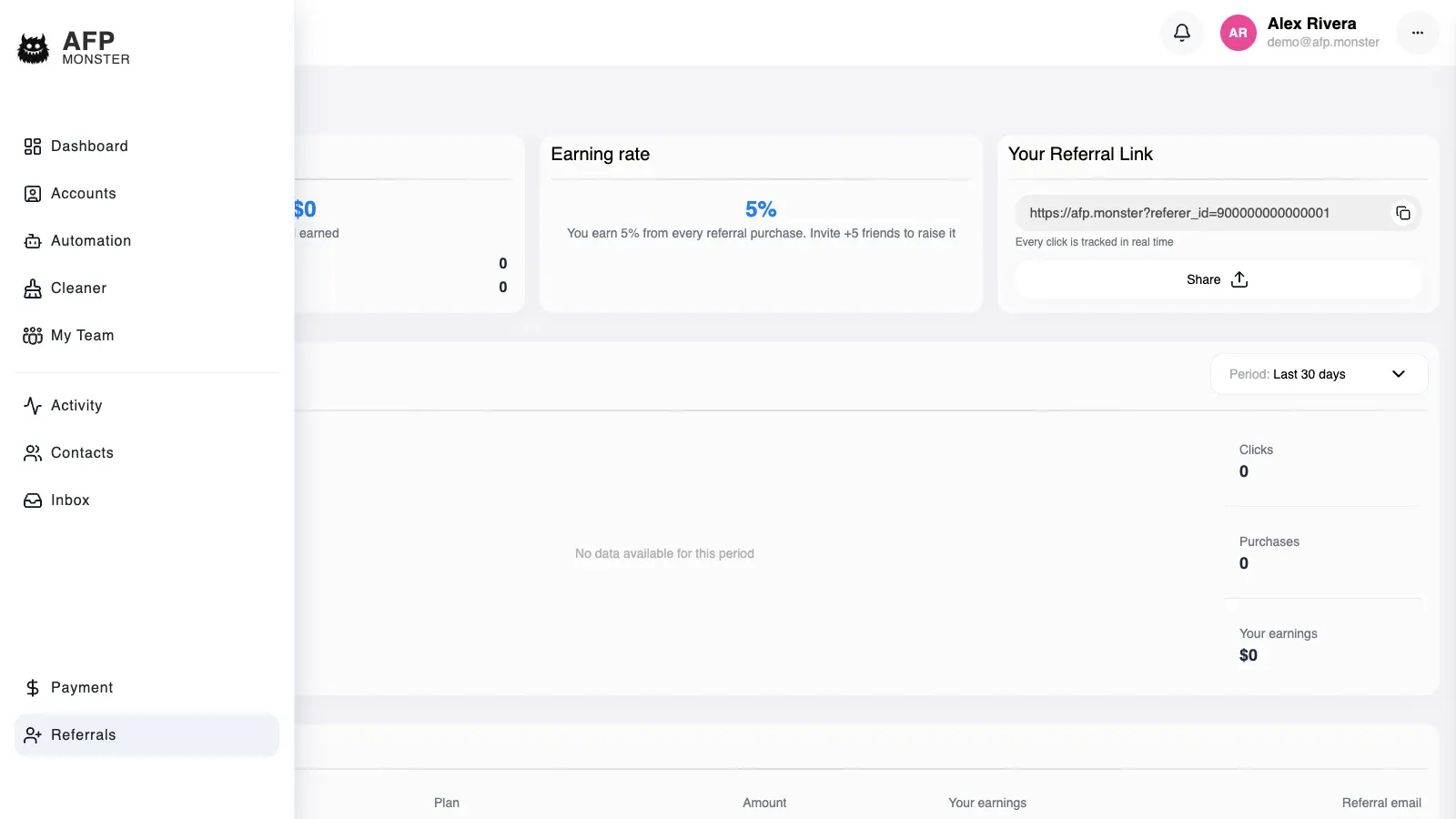
Section titled “How do I find my referral link?”Open Referrals in the app. The page shows the link to share, the share of each referred payment that becomes your commission, and your totals so far.
The link ends in an identifier that belongs to your programme. That identifier is what ties a click, a later signup, and every payment that account makes back to you, so share the link whole rather than rebuilding it by hand. A link carrying an identifier AFP does not recognise records nothing and reports no error, which is how a mistyped link can look like it is working.
How is a click attributed to me?
Section titled “How is a click attributed to me?”- The visitor opens your link. AFP records a click against your programme and their browser keeps a cookie naming it.
- The visitor signs up. If the cookie is still in that browser at that moment, the new account is attributed to your programme.
- The referred account pays for a plan. The payment counts toward your purchases and your earnings once it settles.
Both routes into AFP are attributed the same way. Someone who signs up with an email address and someone who signs in with Facebook each arrive carrying your programme, and payments from either count toward your totals.
Clicks are counted once per browser and network. A second visit to your link from the same browser on the same connection adds nothing to the click total, so the figure counts distinct visitors far better than it counts visits.
Attribution happens during signup and only then. Someone who opens your link in one browser and signs up in another, clears cookies first, or uses a private window that discards them, arrives as an unattributed account, and nothing links them to you afterwards.
When does a referral earn commission?
Section titled “When does a referral earn commission?”Commission accrues on payments, not on signups. A referred account that never pays earns you nothing, however many clicks it took to get there.
A payment counts once it has settled. An invoice that is created and left unpaid, or cancelled, never reaches your totals — Plans and billing covers how a referred account raises and pays an invoice. Once the payment is recorded as paid, its amount counts as one purchase and its commission is added to your earnings.
A referred account that keeps buying keeps paying you. Every settled payment from an account still attributed to your programme counts the same as its first one, including the ones that extend a subscription it already has.
Crediting runs separately from the payment itself, so a settled payment can reach your totals slightly later than it reaches the payer’s subscription.
What do the referral stats and chart show?
Section titled “What do the referral stats and chart show?”| Figure | What it counts |
|---|---|
| Referral link | The link to share, ending in your programme’s identifier |
| Your share | The percentage of each referred payment that becomes your commission |
| Total clicks | Visits to your link, counted once per browser and network |
| Purchases | Payments from accounts attributed to your programme that have settled |
| Total earnings | The running total AFP has recorded for your programme |
The chart plots the same three moving figures over time — clicks, purchases, and earnings — grouped into one-day buckets by default and ordered oldest to newest. Days with no activity carry no bars, and a programme that has never had a click plots nothing at all.
The chart covers the range you ask it for. A click you remember making sits outside an empty chart when the range starts after that day, so widen the range before concluding the click was lost.
Where do my earnings appear?
Section titled “Where do my earnings appear?”The earnings list on the Referrals page shows one row per settled payment from an account you referred, newest first, a page at a time. Each row carries the amount paid, your commission for that payment, and the payer’s email address with most of it hidden — j***@example.com — so you can tell rows apart without seeing who they are.
Each row’s commission is worked out when you open the list, from the amount paid and the share your programme carries at that moment, rather than being fixed when the payment settled.
AFP records what you have earned; the Referrals page has no withdrawal step of its own.
What is a coupon code?
Section titled “What is a coupon code?”A coupon code discounts a first payment and, at the same time, attaches the buyer to the referral programme that owns the code. It is the second way into a programme: a referral link attributes by click, a coupon attributes by code.
Enter it at checkout, on either payment method. The discount is worked out live, so the total on screen already has it applied before you pay.
Two things to know:
- The discount applies to the payment that redeems it, and to no renewal. A twelve-month term discounted by a coupon renews at full price.
- A coupon overrides a link. If you arrived through one person’s referral link and then use a coupon belonging to a different programme, the coupon wins and the later commission goes with it.
Some links carry a coupon for you and fill the field in automatically.
Coupons are issued by AFP rather than minted by you, so a programme owner cannot create their own codes from the app.
Why was my coupon code refused?
Section titled “Why was my coupon code refused?”The checks run in order and you are told the first one that fails.
| Message | What it means |
|---|---|
| Coupon not found | The code does not exist. Check for a typo |
| Coupon is inactive | The code has been switched off |
| Coupon is not active yet | The code has a start date that has not arrived |
| Coupon has expired | The code has passed its end date |
| Coupon usage limit reached | The code has been used as many times as it allows, in total |
| Coupon not valid for this plan | The code is restricted to other plans |
| Coupon not valid for this billing period | The code is restricted to other terms — try a different number of months |
| Coupon is only for new customers | You have paid for AFP before. Codes apply to a first payment only |
| You have already used this coupon | You have redeemed this code the maximum number of times |
A fixed-value coupon worth more than your total takes the total to zero rather than leaving a credit for later.
Why is a referral not showing up?
Section titled “Why is a referral not showing up?”| Symptom | Cause | Fix |
|---|---|---|
| Clicks rise but purchases stay at zero | Commission accrues on settled payments, not on signups | Nothing to fix — the accounts you referred have not paid yet |
| Someone opened your link but their account is not attributed | The cookie was gone by the time they signed up: another browser, a private window, or cleared cookies | Ask them to open the link again in the browser they will sign up in; attribution cannot be added afterwards |
| Your own visits do not raise the click total | Clicks are counted once per browser and network per programme | Check the total from a different browser on a different connection |
| A payment settled but your earnings are unchanged | Crediting runs separately from the payment and can trail it | Re-check the next day, then open a support ticket with the date of the payment |
| Every figure reads zero, including clicks you know happened | AFP found no referral programme for the account and reported zeros instead of failing | Open a support ticket so the programme can be restored |
| The chart is empty for a period you know had clicks | The chart shows only the days inside the range requested | Widen the date range on the chart |
| A link you shared records nothing at all | The identifier in the link is not one AFP recognises, and an unrecognised link fails quietly | Copy the link from Referrals again and re-share it |
Related
Section titled “Related”- Create your account — the signup that creates your referral programme, and how two signup routes merge into one account.
- Plans and billing — what a referred account is paying for when your commission accrues.
- Glossary — commission, referral programme, and the rest of the vocabulary used here.
- Get help — the ticket to open when a settled payment never reaches your earnings.