Comments and inbox
Moderate comments
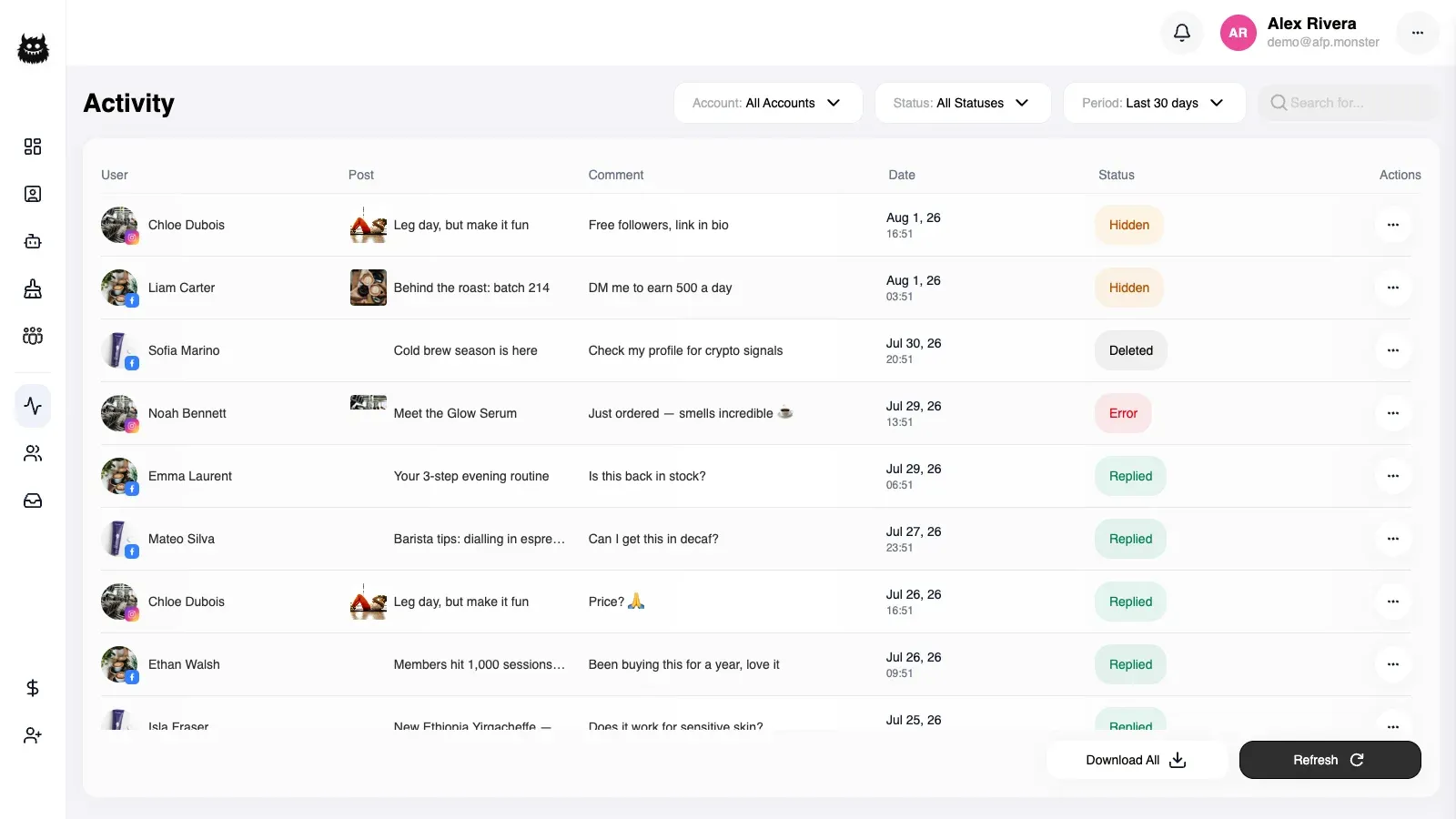
Activity lists every comment AFP has handled on your connected pages, and each row carries the moderation actions: reply publicly, hide the comment, unhide it, delete it, or block its author on that page. Rows that failed can be retried from the same place. The counts and chart above the feed show how much moderation happened over a period, and any filtered view of the feed can be exported. Clearing out many old comments at once is a separate tool.
What you need first
Section titled “What you need first”- A connected page AFP is receiving comment events for. A page AFP hears nothing from contributes no rows. See Connect a page.
- An active subscription. Manual replies and every moderation action check it before they touch Facebook or Instagram, and refuse with a message about a missing or expired subscription.
What is in the activity feed?
Section titled “What is in the activity feed?”One row per comment AFP handled, on any connected page, on either platform. The feed is read-only history: acting on a row changes the comment on Facebook or Instagram, never the record of what automation did to it.
| What a row shows | Worth knowing |
|---|---|
| Commenter and message | The name the platform reported and the comment text, both searchable |
| Page and platform | Which connected page received the comment, and whether it was Facebook or Instagram |
| Post | Caption, image, and a link through to the post the comment sits on |
| Recorded action | What automation did to the comment when it arrived |
| Current state | Where the comment stands now: new, visible, hidden, deleted, or its author blocked |
| Arrival time | When AFP handled the comment, which is what the date filters and the chart bucket on |
| Campaign | The campaign that acted on the comment |
The recorded action and the current state are deliberately separate. Acting by hand updates the state and leaves the recorded action alone, so the feed keeps answering “what did my automation do” even after a person intervened.
These are the recorded actions a row can carry, and they are also what the action filter, the counts, and the chart are built from.
| Recorded action | What it means |
|---|---|
| Replied | A campaign matched the comment and answered it |
| Hidden | A campaign hid the comment |
| Deleted | A campaign deleted the comment |
| Deleted and blocked | A campaign deleted the comment and blocked its author on the page |
| Error | AFP could not act — a plain failure, a page whose stored access needs renewing, or a comment that arrived while the subscription was not active |
How do I filter the feed to the comments I care about?
Section titled “How do I filter the feed to the comments I care about?”Every filter combines with the others, so a row has to satisfy all of them to appear.
| Filter | What it narrows to |
|---|---|
| Page | One connected page instead of all of them |
| Platform | Facebook comments or Instagram comments |
| Action | Rows with one recorded action — replied, hidden, deleted, deleted and blocked, or errors |
| Date range | Comments AFP handled between two dates |
| Search | Part of the commenter’s name or of the comment text, in any case |
| Sort | Newest first or oldest first |
The errors filter is one filter over three outcomes: a plain failure, a page whose access needs renewing, and a comment that arrived without an active subscription. All three appear together, which is what makes it a work queue rather than three separate hunts.
The feed arrives a page at a time, and each page of results carries the total number of matching comments and the number of pages alongside it, so you can tell a filter that matched nothing from one whose matches are further down the list.
How do I reply to, hide, or delete one comment?
Section titled “How do I reply to, hide, or delete one comment?”- Open Activity and narrow the feed until the row you want is visible.
- Click the action on that row — reply, hide, unhide, delete, or block.
- For a reply, type the message and send it. It appears publicly under the original comment on Facebook or Instagram.
A manual reply is not added to the feed. The feed records comments that came in, not the answers you write by hand, so check the post itself to confirm what was published.
| Action | What it does | Reversible | |
|---|---|---|---|
| Reply | Publishes your text as a public reply under the comment | Not from AFP | Yes |
| Hide | Hides the comment on the post | Yes, with unhide | Yes |
| Unhide | Makes a hidden comment visible again. A comment that automation hid returns to the new state, so it comes back into the default view | n/a | Yes |
| Delete | Removes the comment from the post | No | Yes |
| Block | Blocks the comment’s author on the page | Yes, with unblock | No |
| Unblock | Lifts the page block on that person | n/a | No |
How do I block a commenter?
Section titled “How do I block a commenter?”Blocking from a comment row adds the person to that page’s block list, which stops them sending the page direct messages and commenting on its posts. Nothing they already posted is removed, so hide or delete their existing comments as a separate step. Unblocking lifts it again.
Instagram comments have no block action, and choosing it on an Instagram row does nothing. Hiding or deleting the comment is the way to act on an Instagram commenter.
The same page block list backs the block action in the inbox — see Handle conversations in the inbox. Campaigns can also block automatically: the hide and delete nodes carry a Facebook-only option that blocks the author in the same step, which is what produces the deleted-and-blocked rows in the feed. See Node types.
What do the period counts and the chart tell me?
Section titled “What do the period counts and the chart tell me?”The counts above the feed cover the page and date range you selected, and each one is paired with its change against the preceding comparison period — that delta is what the trend arrows read.
| Count | What it counts |
|---|---|
| Replies | Comments a campaign answered |
| Hidden | Comments automation hid |
| Deleted | Comments automation deleted |
| Blocked users | Comments where automation deleted the comment and blocked its author |
| Re-login errors | Comments AFP could not act on because the page’s stored access needs renewing |
| Subscription errors | Comments that arrived while the subscription was not active |
| Inbox conversations | Conversations in the inbox for the same page selection, which stops counting at 100 per page and platform. See Handle conversations in the inbox |
The chart plots the same data over time. It buckets rows by hour, by day, or by month across the range you chose, with a series for hidden, deleted, blocked, and replies, plus a total.
Counts and chart both measure what automation did. A comment you hid by hand keeps its original recorded action, so it never joins the hidden count — the numbers stay a picture of your campaigns rather than of your manual work.
How do I export activity?
Section titled “How do I export activity?”- Filter the feed to what you want out. The export applies the same filters as the feed.
- Start the export. The download begins immediately, with the export time in the filename.
- Open the file. Rows come out as JSON, and an export of 100,000 rows or more arrives as a ZIP holding a single JSON file.
An export with no matching rows still downloads, containing an empty list.
Only a few exports run at the same time. When they are all busy the request is refused with a message asking you to try again shortly, and re-running it a moment later is all that is needed.
Why did a comment end up in the errors filter, and can I retry it?
Section titled “Why did a comment end up in the errors filter, and can I retry it?”Errors are comments AFP received but could not act on, and retry re-runs them. Fix the cause first: renew the page’s access before retrying a re-login error, and make sure the subscription is active before retrying a subscription error.
- Filter the feed to errors.
- Confirm the cause the row shows, and fix it.
- Retry the row. AFP re-runs the comment through campaign matching from the beginning, exactly as if it had arrived at that moment, so keyword matching and every campaign action happen now.
- Reload the feed to see the outcome.
Retry only exists on errored rows. A row that already recorded a reply, a hide, or a delete has nothing to re-run.
Retry does not carry the comment’s original image or video — only its text is replayed. A campaign whose condition filters on images or GIFs can therefore behave differently on retry than it would have when the comment first arrived. See Match comments with keyword lists.
Retry also cannot resume a campaign that was parked waiting for a reply. A retried comment always re-enters campaign matching from the trigger, so use the execution history rather than retry when the question is why a waiting campaign never continued. See Test and debug a campaign.
Why is moderation not working?
Section titled “Why is moderation not working?”| Symptom | Cause | Fix |
|---|---|---|
| Every action refuses with a subscription message | Manual replies and moderation actions check the subscription before anything else | Renew the subscription, then repeat the action |
| An action reports that the comment was not found | The row belongs to a page you no longer own, or the page’s stored access could not be renewed | Re-authorise the profile that owns the page |
| A reply is refused with a message from Facebook or Instagram | The platform declined it — for example the comment is no longer available | Reload the feed and check the post; a comment that is gone cannot be replied to |
| Block does nothing on an Instagram comment | Instagram comments have no block action | Hide or delete the comment instead |
| A manual hide or delete does not change the row’s recorded action | The recorded action always describes what automation did; manual actions move the current state instead | Read the row’s current state column |
| The link to the post opens nothing | For a Facebook row with no stored post link, AFP builds one from the post identifier, and that link does not resolve for a deleted or private post | Open the post from the page itself |
| An export is refused | Every concurrent export slot is already in use | Try again shortly |
| The counts look wrong next to the feed | Counts and chart cover only the selected page and date range | Widen the date range, or clear the page filter |
| The feed is empty | Nothing has been handled for those filters, or the page sends AFP no events | Clear the filters, then check the page on Accounts. See Connect a page |
| Errors keep appearing for one page | The page’s stored access is failing repeatedly, so each new comment is recorded as an error instead of acted on | Re-authorise the profile, then retry the errored rows |
Related
Section titled “Related”- Handle conversations in the inbox — the private side of the same audience, and where the inbox conversation count comes from.
- Bulk-remove comments with the cleaner — removing many existing comments at once, rather than one row at a time.
- Route comments to a DM — the campaign that produces most of the rows in this feed.
- Node types — the hide, delete, and reply nodes that automate what this page does by hand.
- Read the dashboard — what the moderation figures on the dashboard count.