Team
See what your team changed
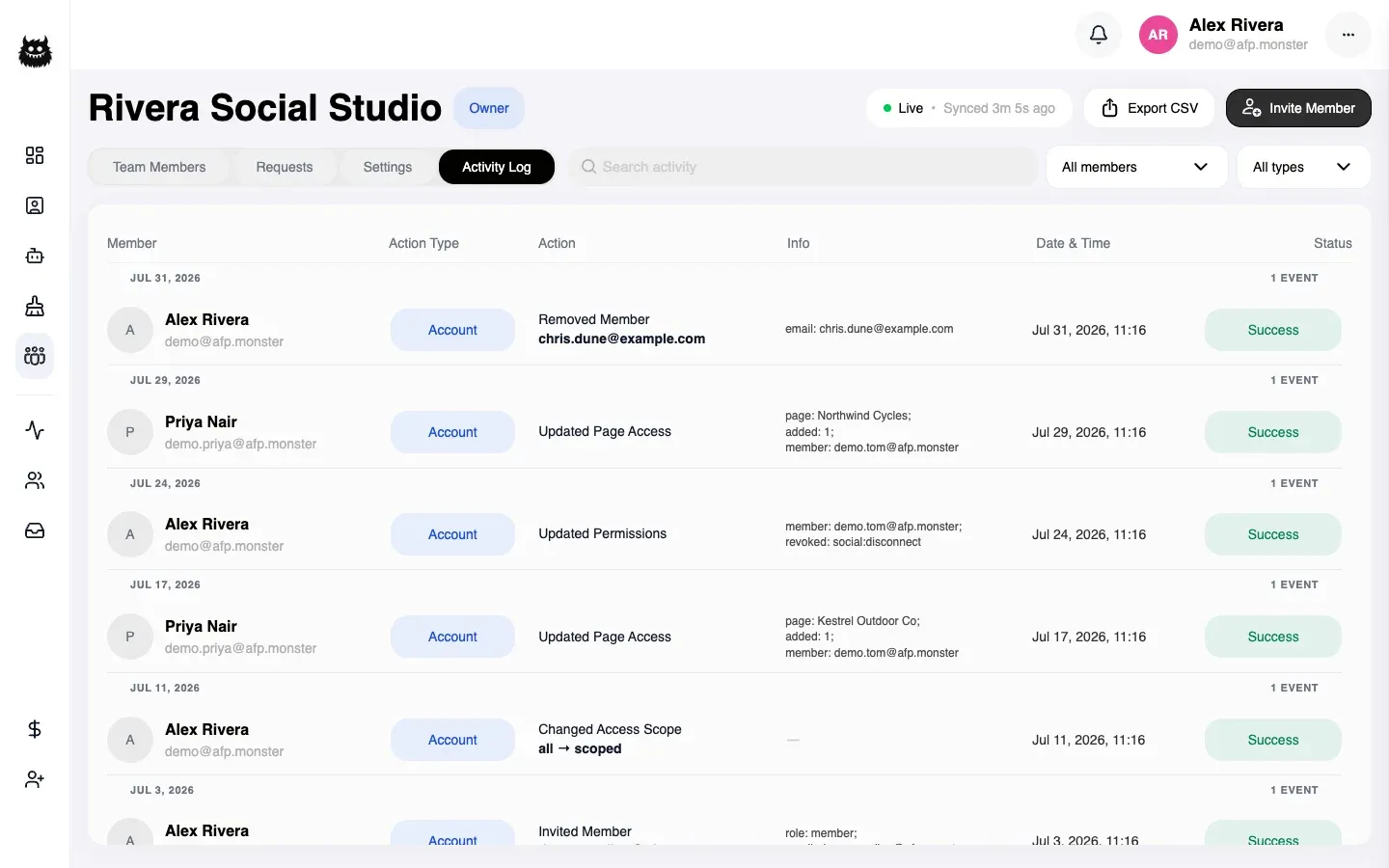
The activity log records your team’s membership changes and a defined set of campaign, page, and billing changes, newest first, grouped by day. One row names the person, the kind of action, what they did, the detail that identifies the thing they did it to, the time, and whether it succeeded. It covers membership changes and product changes alike, so a deleted campaign and a revoked invitation appear in the same list.
What you need first
Section titled “What you need first”- Membership of a team. Any member can read the log; you do not need to be an owner or admin. See Work as a team.
Where do I find it?
Section titled “Where do I find it?”My Team → Activity Log.
The log belongs to the team, not to you, so every member sees the same entries regardless of which pages they are assigned.
What does one row tell me?
Section titled “What does one row tell me?”| Column | What it holds |
|---|---|
| Member | Who did it, with their email address |
| Action Type | The area the change belongs to |
| Action | What they did, and the thing they did it to |
| Info | The detail that identifies it — an email address, a page name, an amount |
| Date & Time | When it happened |
| Status | Whether the action succeeded |
The Info column is what makes an entry useful after the fact. A page-access change names the member it applies to and lists the pages added and removed. A removal names the account that was removed and the role it held. A payment names the amount.
Activity log actions lists every action that can appear and what each one records.
How do I find one specific change?
Section titled “How do I find one specific change?”Four filters narrow the list, and they combine:
- Member — everything one person did.
- Type — one area, such as account changes or billing.
- Search — free text, matched against the entry.
- Date — a day or a range.
Rows stay grouped by day with a count per day, so a filtered view still shows you when a run of changes happened rather than just how many.
Working backwards from a symptom is the usual way in: pick the day the thing broke, then read what happened that day.
Which changes are recorded?
Section titled “Which changes are recorded?”Both kinds, in one list.
| Area | Examples |
|---|---|
| Team | Created, renamed, deleted, ownership transferred |
| Membership | Invited, resent, revoked, declined, joined, removed, left, role changed, access changed |
| Campaigns | Created, updated, deleted, activated, deactivated, canvas saved |
| Pages | Linked, relinked, reconnected, unlinked, deleted, Instagram connected or disconnected |
| Billing | Payment started, payment confirmed, add-on top-up started, invoice cancelled, subscription created, plan changed |
Why is it not working?
Section titled “Why is it not working?”| Symptom | Cause | Fix |
|---|---|---|
| The log is empty | The team is new and nothing has been changed yet | The first entry is the team’s own creation |
| A change you made is missing | Not every action is recorded — reads never are, and some product actions are outside the recorded set | Check the action list in the reference before concluding a change went unlogged |
| My Team is not in the navigation | You are not in a team | A team needs a team plan; see Work as a team |
| A row names an identifier instead of a name | The thing it points at was deleted, so there is no name left to show | The identifier still tells you which one it was |
Related
Section titled “Related”- Activity log actions — every recorded action and what it carries.
- Work as a team — the membership changes that produce most entries.
- Limit a teammate to certain pages — access changes and how they are recorded.